Phone Activation
Activate your product in minutes
1
Verify2
ActivateActivation
Enter the 9 groups of numbers from your phone activation screen
Secure & encrypted connection • Protected by reCAPTCHA
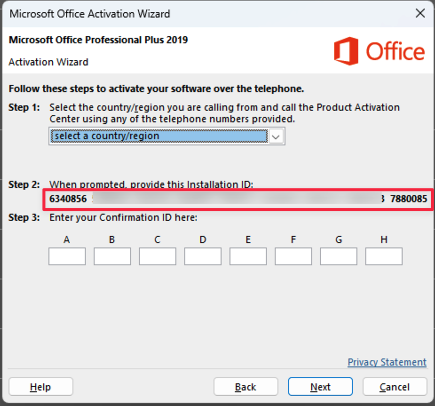
Where to find Installation ID (IID)
Copy the 9 groups of numbers from your activation screen:

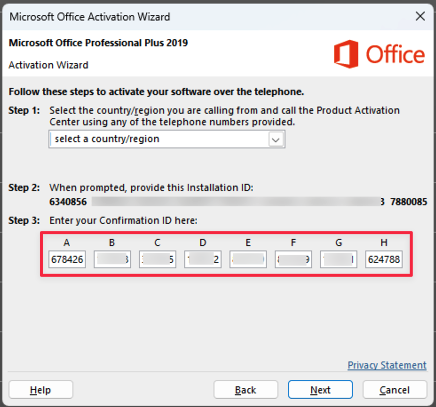
Where to enter Confirmation ID (CID)
Enter these numbers into your activation screen:

Activation Successful!
Your Confirmation ID (CID):
!
Key Replaced
Your original key was blocked. Here is your new key:
Please save this key and use it for future activations.
📝 How to change the license in Microsoft Office:
- Open Word (or Excel, PowerPoint)
- Click on File → Account (in the left menu)
- Click the "Change License" button
- Select "Enter a product key instead"
- Enter your new key and click "Activate"
- Click "Activate product" and follow the activation instructions
💡 After changing the license, you can try phone activation again with your new key.
✕